
Skip to content
PUBLIC RELEASE NOW OPEN · FREE TO START

Trusted spatial answers, assembled instantly.

MapAI helps professionals turn fragmented spatial evidence into answers they can understand and stand behind. Ask a place-based question in plain English. MapAI finds and combines the relevant data, runs the spatial analysis and shows you every source, assumption and step behind the result.

A UNSW Sydney spinout · Built on 3 years of R&D from the City Futures Research Centre

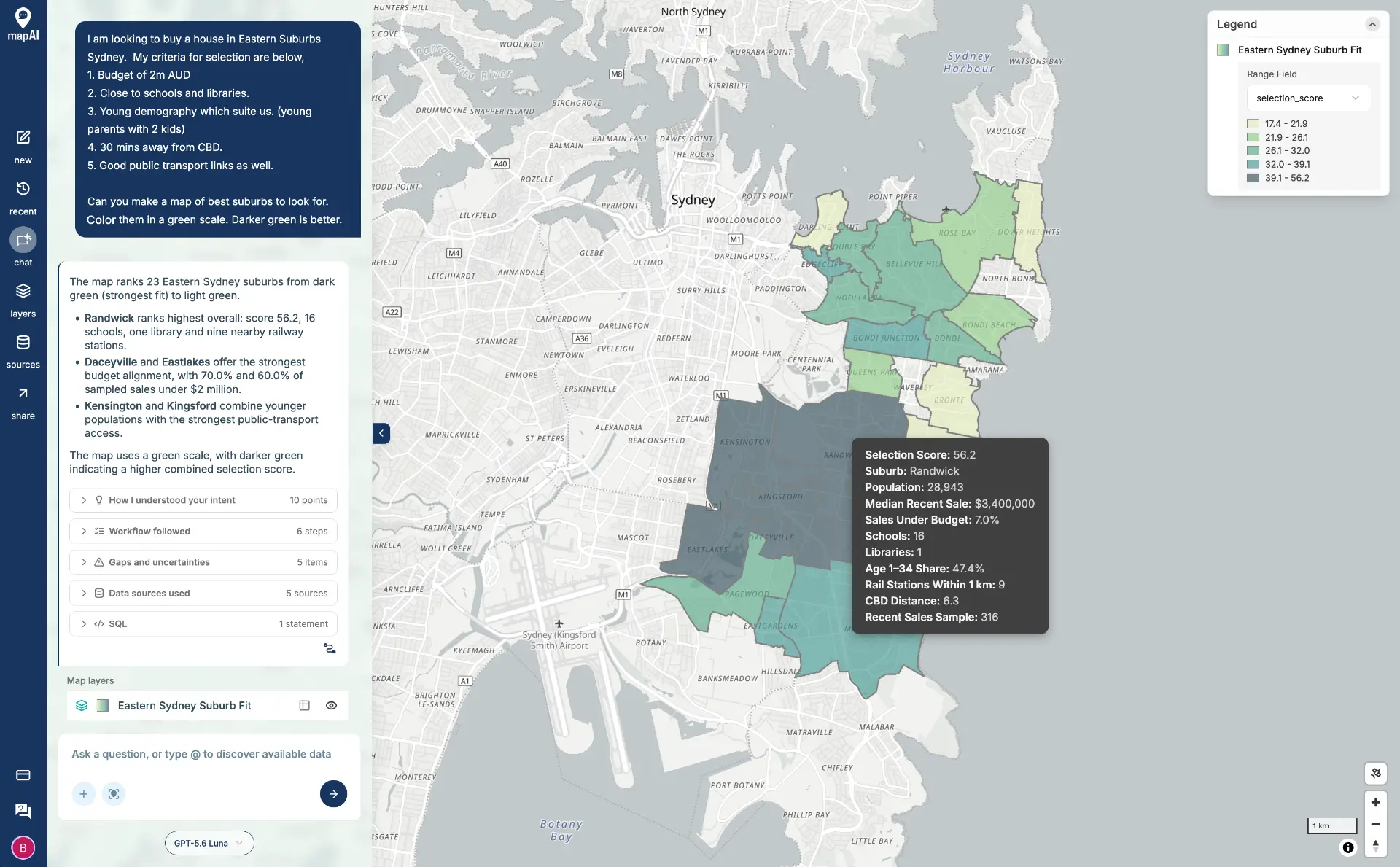
MapAI answering a question about buying a home in Sydney's Eastern Suburbs, ranking the suburbs by a selection score with schools, libraries, transport and sales data shown alongside.

The Spatial Evidence Layer for place-based decisions

MapAI is an AI-assisted spatial analysis platform that sits alongside your existing GIS, whether that is ArcGIS, QGIS, a spatial database or your organisation's own data. It is the layer between your systems of record and the decisions they inform: where spatial evidence is found, assembled, validated and explained.

MapAI does not replace GIS or the specialists who run it. It handles the repeatable work, such as finding, checking, reconciling and combining data, and keeps the evidence trail open so anyone can inspect how an answer was reached.

The friction in place-based intelligence

The hard part happens before the map.

Spatial evidence is spread across open data portals, ArcGIS services, reports, spreadsheets and internal systems. Before a planner, analyst or policy adviser can answer a simple place-based question, they often need to find the right datasets, check their quality and currency, reconcile boundaries and formats, and then repeat it all when the data changes.

GIS systems were built to manage and map data, not to make that evidence quick to assemble or easy to verify. So teams either queue for scarce GIS capacity, or work around it with evidence they cannot fully trace.

MapAI shortens that path without hiding the evidence underneath the answer.

Built for the people who make place-based decisions, and the experts who support them.

MapAI Explore · For domain professionals

A spatial analyst in your pocket, backed by your GIS team's validated methods.

For planners, transport planners, infrastructure and asset teams, property and development, environment and policy professionals. Ask questions such as “Which schools are within bushfire-prone land in this LGA?” or “How much residential land is zoned within 800 metres of these stations?” and get a map, a summary and the evidence behind it.

  • Ask in plain English and refine as you go
  • See which datasets were used and how current they are
  • Inspect the assumptions and steps behind each answer
  • Reuse validated workflows your GIS team has approved
  • Export maps, CSV and GeoJSON for reports and briefings

MapAI Source · For GIS experts · Coming in 2027

Find analysis-ready data faster, and bring it straight into QGIS.

For GIS analysts, spatial data managers and GIS leads. MapAI Source and the QGIS companion are coming in 2027 and will be included at no extra cost, even on the free tier: discover relevant open and paid datasets, check their source, quality and limitations, download them in the format you need, and bring natural-language search and validated methods into QGIS while QGIS stays your core tool. Today, GIS teams use MapAI Explore to validate the methods their organisation reuses.

  • Search across open, partner and organisational data (2027)
  • Review metadata, licensing and limitations before you download (2027)
  • Import and export .shp, .gdb, .gpkg, GeoJSON, KML and CSV (available now in Explore)
  • Connect public ArcGIS REST services (available now in Explore)
  • Validate methods once, then let your organisation reuse them

GIS experts validate the methods. Domain professionals reuse them. Everyone works from the same evidence.

A modern solution for place-based intelligence

Evidence first. Judgement stays human.

Ask a place-based question, bring together relevant data, apply spatial analysis and inspect the evidence behind the result, without replacing the specialist judgement required to make the final decision.

EVIDENCE

Find and combine what matters.

Work across relevant spatial datasets without manually stitching every source together.

Find → Understand → Combine

PROVENANCE

See how the answer was reached.

Sources, analytical steps, assumptions and limitations stay visible, so you can inspect and verify the work.

Evidence you can trace.

REUSE

Repeat what works.

Turn validated spatial queries into reusable workflows and cut rework while keeping oversight.

Validated work, ready to reuse.

JUDGEMENT

Support judgement, don’t replace it.

Automate the mechanical work and keep professional expertise where interpretation, uncertainty and accountability matter.

Human judgement stays human.

How MapAI works

From question to trusted spatial answer, in six visible stages.

01

Find

Identify the spatial evidence relevant to the question.

01

MapAI searches connected open data, partner data and your organisation's own layers, then suggests the datasets most relevant to your question. You can add or remove sources with an @mention.

02

Understand

See the source, quality, context and limitations of the data.

02

Each dataset shows where it came from and when it was last updated, so you know what you are working with before analysis starts.

03

Combine

Bring relevant datasets and organisational evidence together.

03

MapAI aligns boundaries, projections and formats and joins the data on a spatial engine built for the job. Upload your own .shp, .gpkg, GeoJSON or CSV files alongside public data.

04

Analyse

Apply the spatial methods required to answer the question.

04

Buffers, intersections, spatial joins, proximity and demographic cross-tabs run on a PostGIS spatial engine. Where a validated method exists, MapAI uses it, so the same question over the same area returns the same answer.

05

Review

Inspect the evidence, method, assumptions and result.

05

Open the evidence trail to see the datasets, assumptions and steps behind the answer. GIS experts can view the underlying query. Validated methods are marked, so you know when a specialist has reviewed the approach.

06

Repeat

Reuse validated queries and workflows when the work needs to be run again.

06

Validated queries can be rerun for a new area or when data changes. Saved, shareable workflows are planned.

What teams use MapAI for

Catchment and density analysis

Measure who and what sits within walking, driving or service catchments, and how density changes across them.

Example question: “How many dwellings and residents are within 800 m of each station on this line?”

Social-impact assessment evidence

Assemble the population, services and facilities evidence a social-impact assessment needs, with sources attached.

Example question: “Which childcare centres, schools and health services are within 1.5 km of this development site?”

Social and affordable housing site identification

Screen government and other land against zoning, hazards, access and services, then show the evidence behind the shortlist.

Example question: “Which publicly owned parcels over 2,000 m² in this LGA are zoned for residential use and outside flood-planning areas?”

Housing and infrastructure sequencing

Test where existing capacity can absorb new homes and where upgrades are needed first.

Example question: “Where can the existing network absorb 5,000 new homes with the least infrastructure upgrade?”

Disaster resilience and hazard exposure

Find the assets, people and services in flood, bushfire or other hazard areas.

Example question: “Which schools in this region are in bushfire-prone areas?”

Evidence for briefings and business cases

Assemble a traceable evidence base for a place, project or decision, ready to brief upwards.

Example question: “Summarise the land use, population and transport access within this precinct, with sources.”

Research and validation

Foundational GeoAI, built on Australian research.

MapAI was spun out of UNSW Sydney after about two and a half years of research and development at the City Futures Research Centre, led by Professor Christopher Pettit. That research into the reliability, transparency and evaluation of AI-assisted geospatial analysis still shapes how the platform is built.

ArchistarUNSW Sydney

Urban Copilot

MapAI provides the geospatial chat and spatial reasoning engine inside Urban Copilot, Archistar's AI planning product, funded through the Australian Government's Cooperative Research Centres Projects program, with UNSW City Futures as research partner.

Read Archistar's announcement
UNSW Sydney

Infrastructure Sequencing Engine

MapAI holds the commercial rights to the Infrastructure Sequencing Engine, a planning tool being developed with UNSW that helps coordinate housing growth with transport, utility and community infrastructure.

Shaped by professionals

MapAI is being tested with teams across state government, local government and the private sector in planning, infrastructure and advisory roles.

Read the research

Built for sensitive, place-based data.

  • Australian-hosted infrastructure, with data residency options for government work
  • Your organisation's data stays yours and is not used to train public models
  • Single sign-on and advanced security controls on Enterprise
  • SOC 2 and ISO 27001 programmes underway
  • Bring-your-own model account supported for Enterprise

Pay for the analysis, not the seats.

Unlimited users on every plan. Start free with an allowance of free credits every month. Buy more capacity in batches when you need more. Enterprise committed capacity on request.

Common questions

Is MapAI available now?

MapAI Explore is available in Australia and free to start. Sign up to get started, or request a structured trial built around a real workflow for your team.

How do I get started?

Sign up for a free MapAI account and ask a place-based question in plain English. Bring your own files or use connected public data, then inspect the sources, assumptions and steps behind the answer. For a team workflow, request a structured trial.

What is MapAI?

MapAI is an AI-assisted spatial analysis platform from Australia. It helps professionals turn fragmented spatial evidence into answers they can understand and stand behind, and it shows the sources, assumptions and steps behind every result.

Does MapAI replace GIS?

No. MapAI sits alongside GIS such as ArcGIS and QGIS. It speeds up finding, combining and analysing spatial evidence, while GIS remains the system of record and GIS experts validate the methods others reuse.

What is a Spatial Evidence Layer?

It is the layer between GIS systems of record and the decisions they inform. It is where spatial evidence is discovered, assembled, validated and explained, then delivered as trusted answers to domain professionals or analysis-ready data to GIS experts.

What data can I use?

Open government data, partner data and your own files, including Shapefile, File Geodatabase, GeoPackage, GeoJSON, KML and CSV, plus public ArcGIS REST services.

Does it work with QGIS?

You can import and export the formats QGIS uses today (.shp, .gpkg, GeoJSON, KML, CSV). The QGIS companion, part of MapAI Source, is coming in 2027 and will be included at no extra cost, even on the free tier. Register interest to be first to try it.

How much does it cost?

MapAI is free to start, with an allowance of free credits every month and no per-seat licences. When you need more, buy additional capacity in batches. Enterprise committed capacity, with unlimited users, is available on request.

Stay across trusted spatial analysis

The Radar is a monthly email with research, worked examples and product updates for people who make place-based decisions.

By subscribing you agree to receive The Radar by email. Unsubscribe at any time. See our Privacy Policy.

  • New research on trustworthy GeoAI from UNSW City Futures and the MapAI team
  • Worked examples from planning, infrastructure and policy teams
  • Product updates, new data sources and what's coming for MapAI Source and the QGIS companion

See the evidence.
Trust the answer.

Sign up and start free, or talk to us about a structured trial for your team.

Sign up